Wide & exterior
First-Frame / Last-Frame Horizon Transition
Change one variable — the light — and let the geometry prove the transition works.
Open recipe →Wide & exterior · Medium · 6 s
A horizon is the cheapest continuity test in any generated clip. Copy-paste Pavo AI text-to-video prompt for a wide exterior push-in. One vanishing point, one dust plume, a horizon that never tilts. Includes QC fixes.
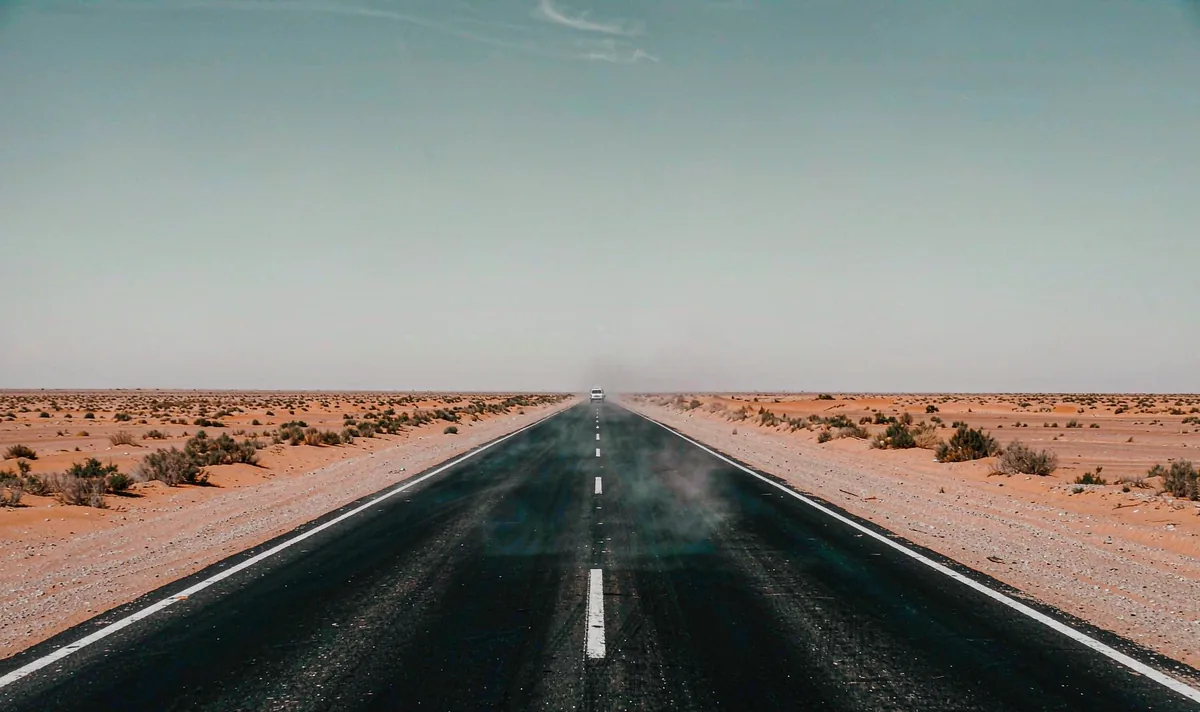
A generated clip inherits every ambiguity in its opening still. Approve the still as a usable composition first, then ask for only the motion this shot actually needs. If one of these checks fails, fix the still — not the prompt.
One action with a beginning, a middle and a held ending gives the model priorities and gives an editor recognisable cut points. Secondary movement stays subordinate to the main action.
Wide hold. The scale of the road and the single car read clearly.
Slow forward dolly; one faint dust plume lifts behind the car and dissipates.
Dolly stops; horizon, road edges and heat shimmer hold without a bump.
List the identity and geometry anchors that must stay fixed. Review them across the whole result, especially during turns and camera moves. If one detail fails, revise that instruction alone.
Copy all six lines into your own generator. Each line owns one decision, so a failed render tells you which line to change. Do not add extra adjectives that do not change a visible production decision.
SUBJECT: An empty straight desert highway at noon, pale sand and low scrub, one small white car far in the distance.
FRAME: Wide 16:9, horizon on the horizontal centre line, single vanishing point, upper third pale-blue sky, hard high sun.
ACTION: Hold the wide frame, then one faint dust plume lifts behind the distant car and fades; no other movement.
CAMERA: Very slow forward dolly along the road axis at constant height, no tilt, no roll, no zoom, no cut.
FIXED: Horizon line, vanishing point, road taper, sun direction, car scale, no signs, no lettering, no people.
END ON: A held wide frame with the horizon level and the dust fully settled for 12 frames.
Want to generate your own version? Use the six-line prompt builder.
| Signal | Change this one line |
|---|---|
| The horizon tilts or the road width pulses. | Remove the dolly and regenerate a locked shot; add only the dust. A static horizon is worth more than camera movement. |
| The car doubles or changes shape. | Describe it as a distant generic light-coloured shape and delete all brand, model and detail words. |
Judge this as footage, not as a demo. These are the notes that make the clip usable downstream.
Keep going
Wide & exterior
Change one variable — the light — and let the geometry prove the transition works.
Open recipe →Aerial & parallax
Parallax only works when near and far edges disagree in a consistent way.
Open recipe →Aerial & parallax
Consistency is a filing problem before it is a model problem.
Open recipe →